Serving Fresh Files with S3 Versioning and Presigned URLs
Serving files to clients sounds pretty boring until you have to account for the freshness of the files being served. In a recent project, I had to support serving fresh files while remaining fast and reliable in production. We’ll see what happens when files are updated as a client is in the middle of a download, and how S3 bucket versioning and presigned URLs can solve it.
To understand the problem, lets first establish how the system is structured. We have a pool of 1000 files managed by an external team. We don’t own these files, we just need to serve them to our clients. The external team owns services that will periodically update the existing files with improvements over time.
The basic interaction looks like this:
- Client requests a file
- Our server fetches the file from an external service
- Our server returns the file download link to the client
The interesting part of this problem is trying to serve the freshest version of these files in the most efficient way.

S3 Primer
S3 stores files as objects inside a bucket, which you can think of as a root folder accessible to any server with the right permissions. Within a bucket, each file lives at a specific key, analogous to a file path: bucketA/some/path/to/fileA.
By default, uploading to the same key twice overwrites the file. To protect against corruption or bad updates, S3 offers bucket versioning, which retains the last N versions of a file at a given key and gives you a rollback option if something goes wrong.
For access control, there are two main approaches. The first is IAM role policies, which grant a role broad permissions on a bucket. The second is presigned URLs, which are time-scoped URLs generated by the bucket owner that grant temporary access to a specific file. For serving files to clients or external services you don’t control, presigned URLs are the recommended tool.
Solutions
Level 1: No caching ever
The simplest way to solve this problem would be to pass through the file from the external service directly to the client. However, contractually, this was not allowed, so we need to introduce an intermediate storage layer to share the file. The change to our flow is introducing an S3 bucket to store the external file (after downloading it locally to our server) and then sharing the presigned URL of the file to the client. Clients will always get the freshest version of the file without any extra version management on our end.
But how long is the client stuck waiting? Let’s say the time to download/upload a file takes time t. When a request is made, our server will download the file once and upload to our S3 bucket. That will take time 2t before we can serve the download link to the client. (We can assume download time » time for network hops, server latency, 3rd party API latency). If we say t is roughly ~500ms, the client is stuck waiting 1 second until a file link is ready. In most use-cases, like serving the file in a frontend, waiting 1 second just to get a download link leads to a poor customer experience.
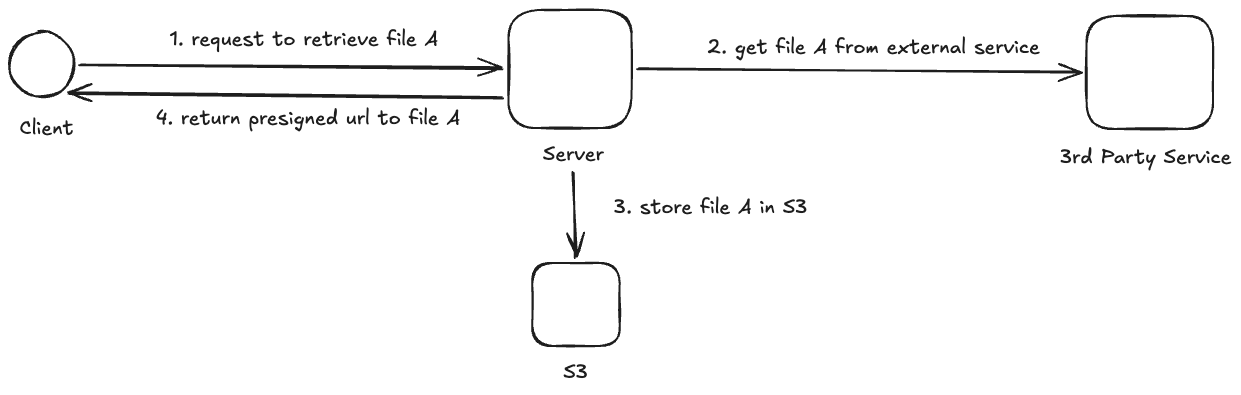
Let’s also consider the server compute perspective; every time a client wants to download a file, our server has to download the file from the external service and upload the file to an S3 bucket. What if the same file is requested by 1000 different clients? We’ll need to download and upload the same file 1000 times(!)
Level 2: Cache files and scheduled update
Let’s address the issue of downloading the same file so many times. We only need to manage and store 1000 files, why not pull those files early and serve them directly from our S3 bucket? We can remove the download/upload from the critical path when returning the download link to clients.
We’ll use a parallel processing path that triggers daily to fetch the files from the external service and store them into S3. We run this daily, accepting a one-day lag in exchange for removing file fetching from the critical path. In our case, files updated daily by the external team made this lag acceptable. When a client requests a file, we just check it exists in the bucket and generate a presigned URL. We effectively freed up 2t of latency in the critical path while still maintaining the freshness requirement.
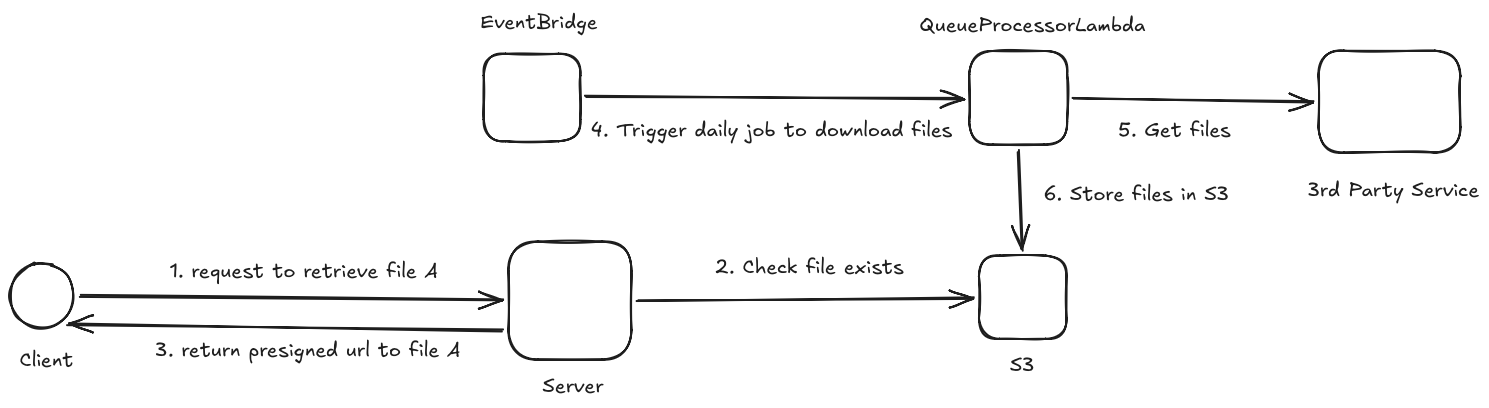
But should we delete files or overwrite them as new ones become available? We should avoid deleting files without verifying the latest version is valid and safe to serve. We can use the overwrite feature in S3 in a versioned bucket: upload files to consistent S3 keys (bucketA/path/to/fileA) and maintain the last 3 versions. Keeping a few earlier versions lets us roll back up to 3 days if we detect corrupt or erroneous downloads. To avoid exploding storage costs, we can set a lifecycle rule in S3 to delete any file versions older than the 3 latest versions.
What happens mid-download?
Before committing to Level 2, I wanted to validate one assumption: what actually happens to an in-flight presigned URL when the underlying file is being overwritten? Specifically this scenario:
1
2
3
4
5
T0:     file 1 requested
T0 + 1: file 1 version 1 served
T0 + 2: file 1 version 2 overwrite begins
T0 + 3: file 1 requested
T0 + 4: what file 1 version is served ???
The AWS docs don’t directly address this scenario, so I did what any diligent engineer would: I tested it. The script below runs two concurrent threads — one polls the presigned URL every 50ms logging which version it receives, the other waits 3 seconds then overwrites the file.
1
2
3
4
5
6
7
8
9
10
11
12
13
14
15
16
17
18
19
20
21
22
23
24
25
26
27
28
29
30
31
32
33
34
35
36
37
38
39
40
41
42
43
44
45
46
47
48
49
50
51
52
53
54
import boto3
import hashlib
import threading
import time
import requests
from datetime import datetime

BUCKET_NAME = "presigned-url-experiment"
S3_KEY = "test-file.txt"
REGION = "us-east-1"

VERSION_1_CONTENT = b"VERSION_1: The quick brown fox"
VERSION_2_CONTENT = b"VERSION_2: The lazy dog jumps over"

s3 = boto3.client("s3", region_name=REGION)
stop_polling = threading.Event()


def poll_url(url):
    while not stop_polling.is_set():
        response = requests.get(url)
        content = response.content
        # Identify version by comparing raw content
        version = "VERSION_1" if content == VERSION_1_CONTENT else "VERSION_2"
        timestamp = datetime.now().strftime("%H:%M:%S.%f")[:-3]
        print(f"[{timestamp}] {version} (md5: {hashlib.md5(content).hexdigest()[:8]})", flush=True)
        time.sleep(0.05)


def overwrite():
    # Wait 3 seconds then overwrite the file mid-poll
    time.sleep(3)
    print(">>> Overwriting with VERSION_2 now!", flush=True)
    s3.put_object(Bucket=BUCKET_NAME, Key=S3_KEY, Body=VERSION_2_CONTENT)
    print(">>> Overwrite complete!", flush=True)


url = s3.generate_presigned_url(
    "get_object",
    Params={"Bucket": BUCKET_NAME, "Key": S3_KEY},
    ExpiresIn=300
)

# Run both concurrently — poll_thread observes, overwrite_thread triggers the overwrite
poll_thread = threading.Thread(target=poll_url, args=(url,))
overwrite_thread = threading.Thread(target=overwrite)

poll_thread.start()
overwrite_thread.start()

time.sleep(8)
stop_polling.set()
poll_thread.join()
overwrite_thread.join()
The result:
1
2
3
4
5
6
7
[12:52:45.883] VERSION_1 (md5: 70422cb6)
[12:52:46.098] VERSION_1 (md5: 70422cb6)
>>> Overwriting with VERSION_2 now!
[12:52:46.309] VERSION_1 (md5: 70422cb6)
>>> Overwrite complete!
[12:52:46.525] VERSION_2 (md5: fad98e37)
[12:52:46.744] VERSION_2 (md5: fad98e37)
S3 overwrites are atomic. While the overwrite was in progress, version 1 was still being served. Only after the upload completed did version 2 become visible. Armed with this, we can update the underlying S3 object daily without worrying that clients will see incomplete or inconsistent files.
Level 3: Event based update
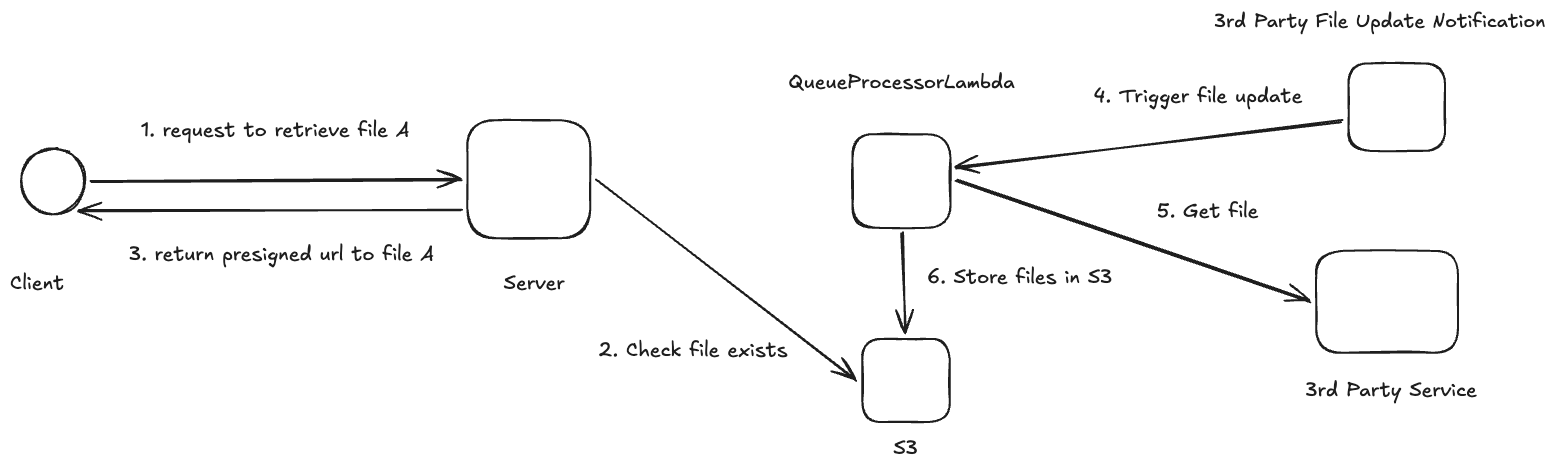
What if all the files don’t actually change that often? With the above approach, we have to check whether each of the 1000 files has changed and trigger a download. Some scheduled runs may find nothing has changed, making the entire invocation wasteful.
We can change the communication model with the external service to notify us when a file has changed; doing so would eliminate the wasteful executions when nothing has changed. This way we know exactly when to update and serve the latest version as needed.
Conclusion
Although Level 3 is probably the best engineering solution, it does require buy-in and engineering time from the external team to implement the logic to notify clients when files change. Sometimes this isn’t feasible and it’s okay to make the cost tradeoff for a solution that works well enough and is delivered sooner. In our case, we went with the Level 2 approach, as that was the most feasible solution given timelines and team capacity.
Fortunately our architecture doesn’t change significantly if we do want to move from Level 2 to Level 3. A lesson I’ve ingrained is that great engineering is making decisions that won’t close doors in the future when you’ve learned more information or the landscape changes.